
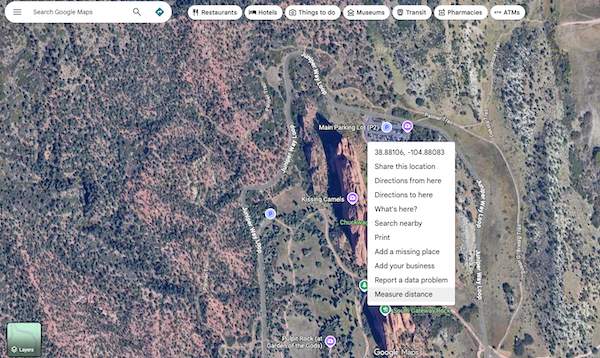
One of the first things I used to start tracking where I was walking was a very simple function on Google Maps.
In the example above, I’ve zoomed in on Garden of the Gods in Colorado Springs, Colorado as an example. I right-clicked my mouse on the parking lot and the dialog window opened. At the bottom, you’ll see “Measure Distance” select that and then you can click on the map and measure distances from the point you originally clicked. Mess up? Easy, you can drag the waypoints you create to more effectively map the distance. The function tells you how many feet you’ve walked (or meters if you prefer) and can be done virtually on any terrain you can find.

Using this, I built a spreadsheet with a simple guide to the routes I take often so I have their measurements. I added a line for each day of the month and voila! A tracker of how many miles I’d walked in a given month which I was able to make into a yearly version.
The rest was, as they say, history. I had a goal in mind and tracked it. Using tools like Google Maps is an easy, effective way to manage your progress. Obviously if you have a favorite tool, or application, for this process keep using it. There are many options available to you for free (like Google Maps) or for purchase.
See you on the trails!